
No products in the cart.
About this item
- Affordable Versatility – A budget-friendly all-in-one printer perfect for both home users and hybrid workers, offering exceptional value
- Crisp, Vibrant Prints – Experience impressive print quality for both documents and photos, thanks to its 2-cartridge hybrid ink system that delivers sharp text and vivid colors
- Effortless Setup & Use – Get started quickly with easy setup for your smartphone or computer, so you can print, scan, and copy without delay
- Reliable Wireless Connectivity – Enjoy stable and consistent connections with dual-band Wi-Fi (2.4GHz or 5GHz), ensuring smooth printing from anywhere in your home or office
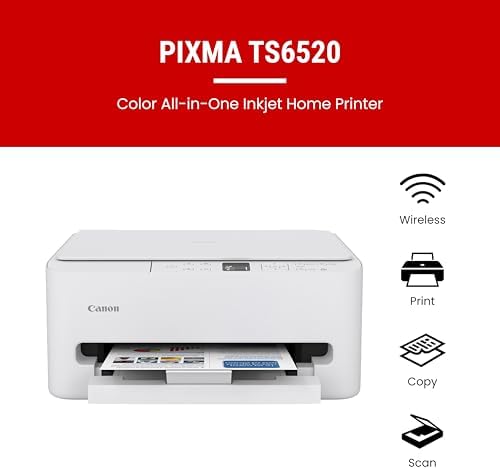
- Scan & Copy Handling – Utilize the device’s integrated scanner for efficient scanning and copying operations
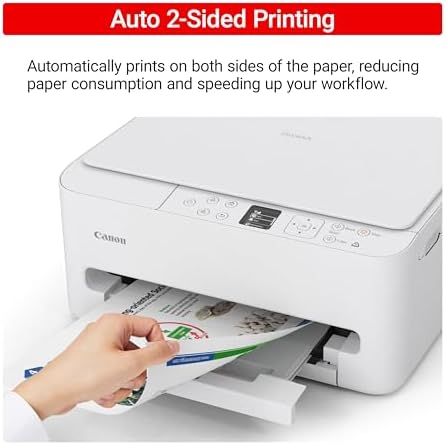
- Save Time & Paper – Optimize your printing with automatic 2-sided printing, reducing paper consumption and speeding up your workflow
- Diverse Media Support – Print a wide range of documents and photos up to 8.5” x 11”, with or without borders, for all your creative and professional needs
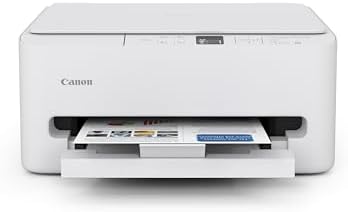
The PIXMA TS6520 strikes a perfect balance between functionality and affordability. While it doesn’t include an ADF like the TR7120, it still offers high-quality printing, scanning, and copying for everyday tasks. Its auto 2-sided printing helps save on paper and its 1.42” OLED display and simple setup make it user-friendly, and its compact design fits easily into any home workspace. With reliable Wi-Fi and mobile printing support, it’s great for printing school projects, recipes, and vibrant photos—without the extra bells and whistles. Best for: Families and students who want a reliable, easy-to-use printer for occasional use without needing advanced features.
Product Gallery




Product Specifications
| Printer Type | Inkjet |
| Other Special Features of the Product | Auto Document Feeder, Borderless Printing, Display Screen |
| Printer Output Type | Color |
| Item Weight | 15.4 Pounds |
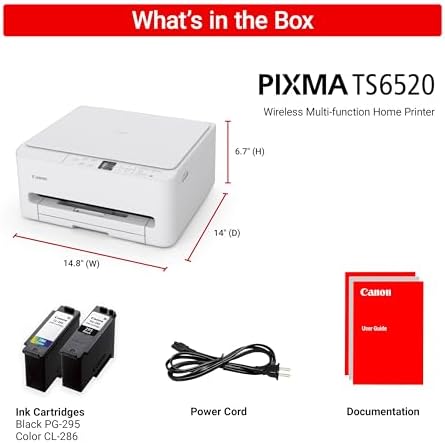
| Item Dimensions D x W x H | 14.8″D x 14″W x 6.7″H |
| Print media | Paper (plain) |
| Scanner Type | Flatbed |
| Maximum Copy Speed Black and White | 11 ppm |
| Compatible Devices | Laptops, PC, Smartphones, Tablets |
| Warranty Type | limited warranty |
| EU Spare Part Availability Duration | 1 Years |
| Ink Color | Cyan, Magenta, Yellow, Black |
| Resolution | 600 x 600 |
| Additional Printer Functions | All In One, Copy, Scan |
| Compatible Cartridge | PG-295 Pigment-Based Black Ink Tank & CL-286 Dye-Based Color Ink Tank (Cyan, Magenta, Yellow, Black) |
| Color Pages per Minute | 9 ppm |
| B&W Pages per Minute | 14 ppm |
| Initial Page Print Time | 7.5 Black and 9.5 Color Seconds |
| Color | white |
| Printer Connectivity Type | USB, Wi-Fi |
| Hardware Interface | USB |
| Total Usb Ports | 1 |
| Dual-sided printing | Yes |
| Duplex | Automatic |
| Brand | Canon |
| Model Name | PIXMA TS6520 |
| Model Number | 7179C002 |
| Built-In Media | PIXMA TS6520 Printer, Power Cord, Setup and Other Documentation, Starter Set of Ink Tanks (PG-295 BK & CL-286) |
| Model Series | PIXMA TS |
| Specific Uses For Product | Home/Office |
| UPC | 013803386400 |
| Customer Reviews | 4.4 4.4 out of 5 stars (161) var dpAcrHasRegisteredArcLinkClickAction; P.when(‘A’, ‘cf’).execute(function(A) { 4.4 out of 5 stars |
| Best Sellers Rank | #1,183 in Electronics (See Top 100 in Electronics) #10 in Portable Photo Printers |
| UNSPSC Code | 43212100 (Computer printers) Report an incorrect code |
| ASIN | B0FMBTJLX6 |
| Item Type Name | Inkjet Printer |
| Item Height | 6.7 inches |
| Manufacturer | Canon |
| Warranty Description | 3 Year Manufacturer |
| Media Size Maximum | Legal (8.5 x 14 inches) |
| Maximum Sheet Capacity | 1 |
| Paper Size | 8.5 x 11 Inches |
| Maximum print Resolution Color | Up to 1200 x 1200 dpi Dots Per Inch |
| Maximum Print Resolution Black and White | Up to 1200 x 1200 dp Dots Per Inch |
| Wattage | 21 watts |
| Maximum Copy Resolution Color | Up to 1200 x 1200 dpi |
| Maximum Copy Resolution Black and White | 600 dpi |
| Brand | Canon |
| Printing Technology | Inkjet |
| Connectivity Technology | USB, Wi-Fi |
| Special Feature | Auto Document Feeder, Borderless Printing, Display Screen |
| Color | white |
| Model Name | PIXMA TS6520 |
| Printer Output | Color |
| Maximum Print Speed (Color) | 9 ppm |
| Max Printspeed Monochrome | 14 ppm |
| Item Weight | 15.4 Pounds |
| Feature | Affordable Versatility – A budget-friendly all-in-one printer perfect for both home users and hybrid workers, offering exceptional value |
| Feature | Crisp, Vibrant Prints – Experience impressive print quality for both documents and photos, thanks to its 2-cartridge hybrid ink system that delivers sharp text and vivid colors |
| Feature | Effortless Setup & Use – Get started quickly with easy setup for your smartphone or computer, so you can print, scan, and copy without delay |
| Feature | Reliable Wireless Connectivity – Enjoy stable and consistent connections with dual-band Wi-Fi (2.4GHz or 5GHz), ensuring smooth printing from anywhere in your home or office |
| Feature | Scan & Copy Handling – Utilize the device’s integrated scanner for efficient scanning and copying operations |
| Feature | Save Time & Paper – Optimize your printing with automatic 2-sided printing, reducing paper consumption and speeding up your workflow |
| Feature | Diverse Media Support – Print a wide range of documents and photos up to 8.5” x 11”, with or without borders, for all your creative and professional needs |
| Feature | Intuitive OLED Display – Easily monitor ink levels, printer status, and adjust settings at a glance using the 1.42” Monochrome OLED screen |
| Feature | Compact & Stylish – Designed to fit seamlessly into any workspace, its small footprint complements your environment without sacrificing functionality |
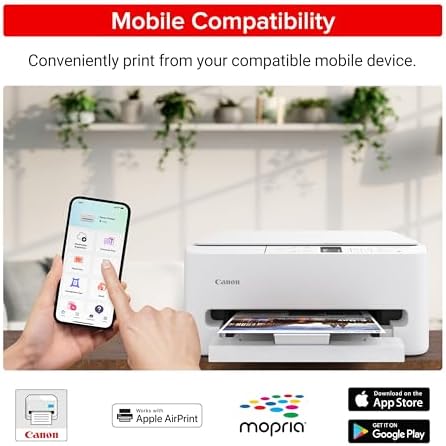
| Feature | Convenient Mobile Printing2 – Print directly from your smartphone or tablet with popular services like the Canon PRINT App, Apple AirPrint, and Mopria Print Service |
| Printer Type | Inkjet |
| Other Special Features of the Product | Auto Document Feeder, Borderless Printing, Display Screen |
| Printer Output Type | Color |
| Item Weight | 15.4 Pounds |
| Item Dimensions D x W x H | 14.8″D x 14″W x 6.7″H |
| Print media | Paper (plain) |
| Scanner Type | Flatbed |
| Maximum Copy Speed Black and White | 11 ppm |
| Compatible Devices | Laptops, PC, Smartphones, Tablets |
| Warranty Type | limited warranty |
| EU Spare Part Availability Duration | 1 Years |
| Ink Color | Cyan, Magenta, Yellow, Black |
| Resolution | 600 x 600 |
| Additional Printer Functions | All In One, Copy, Scan |
| Compatible Cartridge | PG-295 Pigment-Based Black Ink Tank & CL-286 Dye-Based Color Ink Tank (Cyan, Magenta, Yellow, Black) |
| Color Pages per Minute | 9 ppm |
| B&W Pages per Minute | 14 ppm |
| Initial Page Print Time | 7.5 Black and 9.5 Color Seconds |
| Color | white |
| Printer Connectivity Type | USB, Wi-Fi |
| Hardware Interface | USB |
| Total Usb Ports | 1 |
| Dual-sided printing | Yes |
| Duplex | Automatic |
| Brand | Canon |
| Model Name | PIXMA TS6520 |
| Model Number | 7179C002 |
| Built-In Media | PIXMA TS6520 Printer, Power Cord, Setup and Other Documentation, Starter Set of Ink Tanks (PG-295 BK & CL-286) |
| Model Series | PIXMA TS |
| Specific Uses For Product | Home/Office |
| UPC | 013803386400 |
| Customer Reviews | 4.4 4.4 out of 5 stars (161) var dpAcrHasRegisteredArcLinkClickAction; P.when(‘A’, ‘cf’).execute(function(A) { 4.4 out of 5 stars |
| Best Sellers Rank | #1,183 in Electronics (See Top 100 in Electronics) #10 in Portable Photo Printers |
| UNSPSC Code | 43212100 (Computer printers) Report an incorrect code |
| ASIN | B0FMBTJLX6 |
| Item Type Name | Inkjet Printer |
| Item Height | 6.7 inches |
| Manufacturer | Canon |
| Warranty Description | 3 Year Manufacturer |
| Media Size Maximum | Legal (8.5 x 14 inches) |
| Maximum Sheet Capacity | 1 |
| Paper Size | 8.5 x 11 Inches |
| Maximum print Resolution Color | Up to 1200 x 1200 dpi Dots Per Inch |
| Maximum Print Resolution Black and White | Up to 1200 x 1200 dp Dots Per Inch |
| Wattage | 21 watts |
| Maximum Copy Resolution Color | Up to 1200 x 1200 dpi |
| Maximum Copy Resolution Black and White | 600 dpi |
| Brand | Canon |
| Printing Technology | Inkjet |
| Connectivity Technology | USB, Wi-Fi |
| Special Feature | Auto Document Feeder, Borderless Printing, Display Screen |
| Color | white |
| Model Name | PIXMA TS6520 |
| Printer Output | Color |
| Maximum Print Speed (Color) | 9 ppm |
| Max Printspeed Monochrome | 14 ppm |
| Item Weight | 15.4 Pounds |
| Feature | Affordable Versatility – A budget-friendly all-in-one printer perfect for both home users and hybrid workers, offering exceptional value |
| Feature | Crisp, Vibrant Prints – Experience impressive print quality for both documents and photos, thanks to its 2-cartridge hybrid ink system that delivers sharp text and vivid colors |
| Feature | Effortless Setup & Use – Get started quickly with easy setup for your smartphone or computer, so you can print, scan, and copy without delay |
| Feature | Reliable Wireless Connectivity – Enjoy stable and consistent connections with dual-band Wi-Fi (2.4GHz or 5GHz), ensuring smooth printing from anywhere in your home or office |
| Feature | Scan & Copy Handling – Utilize the device’s integrated scanner for efficient scanning and copying operations |
| Feature | Save Time & Paper – Optimize your printing with automatic 2-sided printing, reducing paper consumption and speeding up your workflow |
| Feature | Diverse Media Support – Print a wide range of documents and photos up to 8.5” x 11”, with or without borders, for all your creative and professional needs |
| Feature | Intuitive OLED Display – Easily monitor ink levels, printer status, and adjust settings at a glance using the 1.42” Monochrome OLED screen |
| Feature | Compact & Stylish – Designed to fit seamlessly into any workspace, its small footprint complements your environment without sacrificing functionality |
| Feature | Convenient Mobile Printing2 – Print directly from your smartphone or tablet with popular services like the Canon PRINT App, Apple AirPrint, and Mopria Print Service |
Product Tags
CanonPIXMATS6520WirelessColorInkjetPrinterDuplexPrinting,WhiteHomePrinterwithCopier/Scanner,1.42”OLEDDisplay,IntuitiveControlPanel,CompactDesignElectronics
Discover more from RetailXcess
Subscribe to get the latest posts sent to your email.