
No products in the cart.
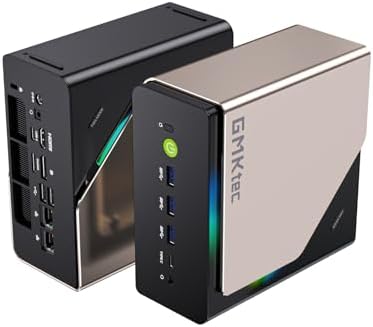
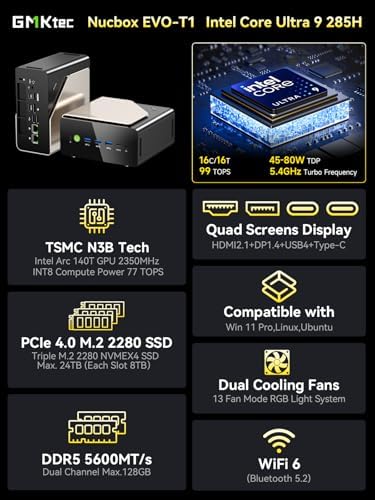
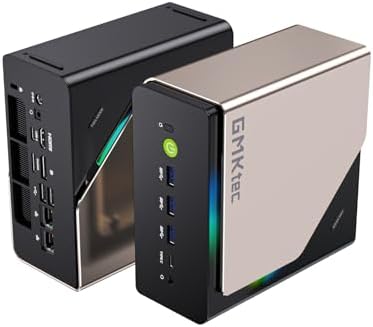
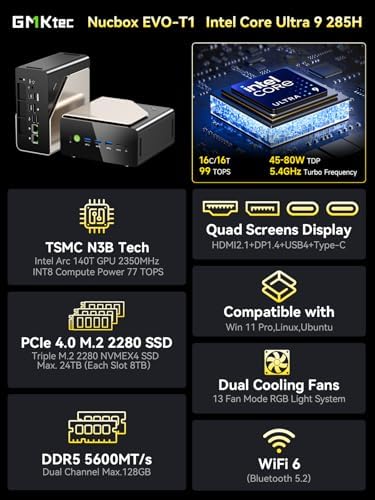
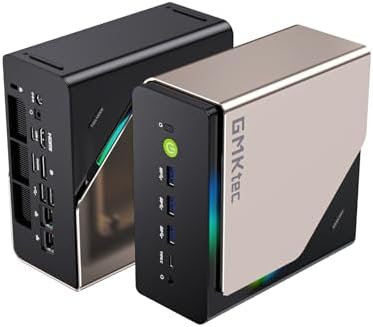
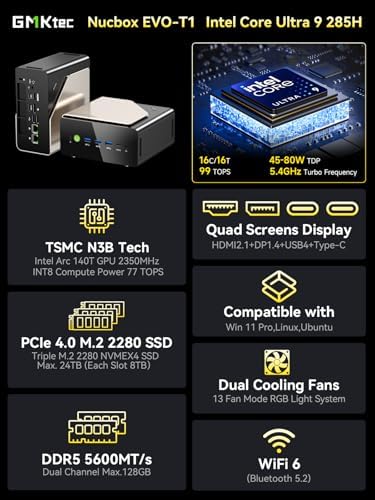
GMKtec AI Mini PC Ultra 9 285H (Turbo 5.4GHz) 96GB DDR5 2TB PCIe 4.0 SSD Mini Gaming Computer 3X M.2 Expansion Slots, Oculink, Quad Screen 8K Display EVO-T1 Electronics – Size : Intel Ultra 9 285H 96GB +2TB
$1,449.99
About this item Product GalleryProduct SpecificationsBrandGMKtecSpecific Uses For ProductEducation, Multimedia, Video Editing, Everyday Use, GamingO
| size_name | Intel Ultra 9 285H 96GB +2TB |
|---|---|
| Brand | GMKtec |
| Specific Uses For Product | Education, Multimedia, Video Editing, Everyday Use, Gaming |
| Operating System | 11 PRO |
| CPU Model | Intel Core Ultra 9 |
| CPU Speed | 5.2 GHz |
| Cache Size | 96 GB |
| Graphics Card Description | Integrated |
| Graphics Coprocessor | Intel Arc 140T GPU 2.35GHz |
| Memory Storage Capacity | 2 TB |
| Personal computer design type | Mini PC |
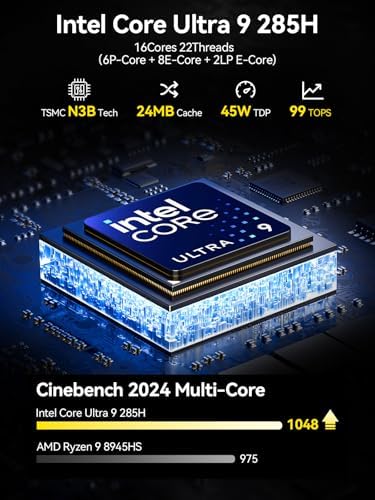
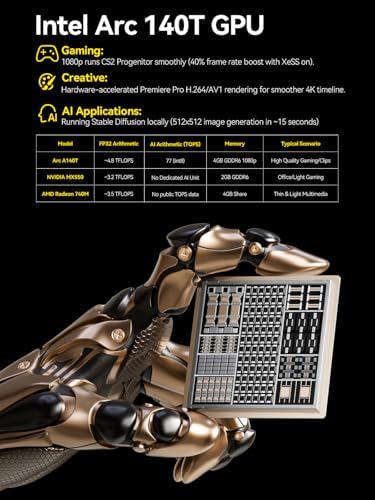
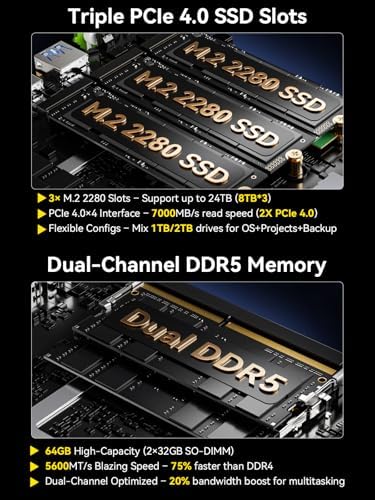
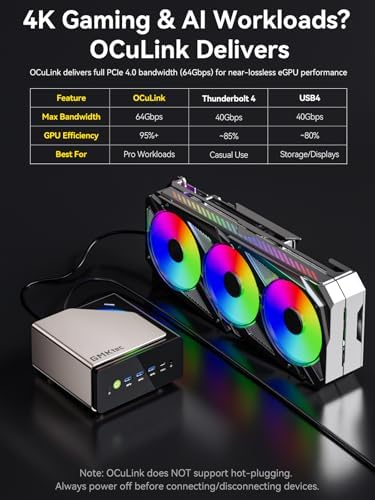
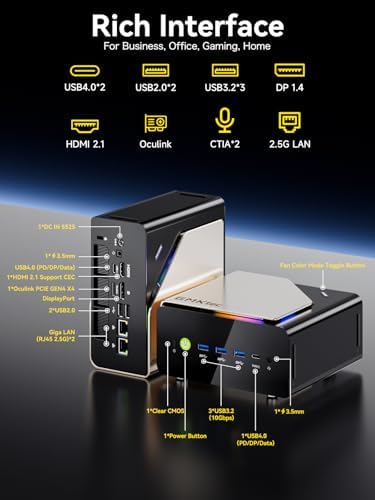
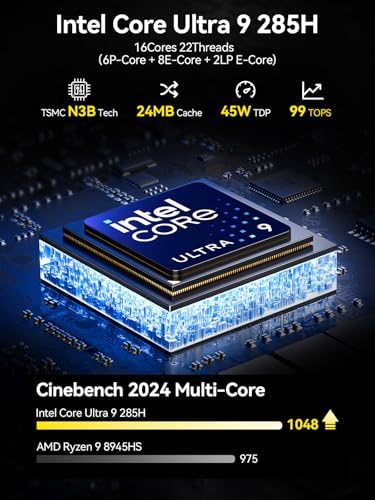
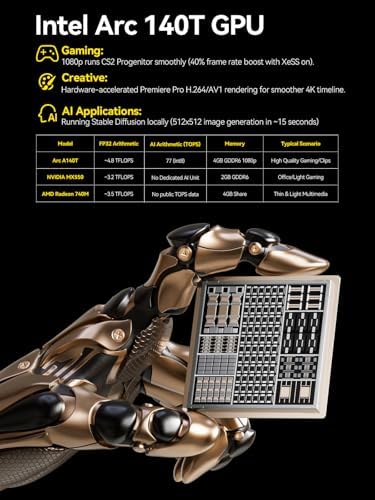
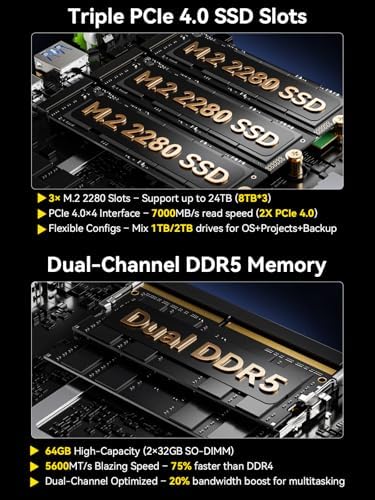
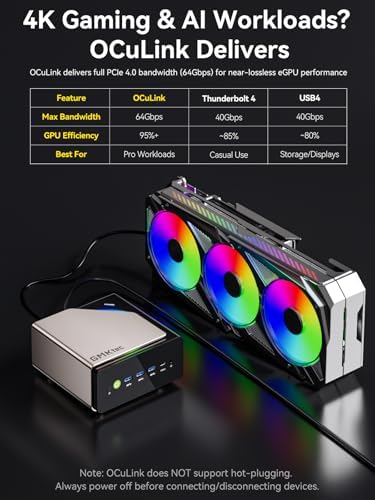
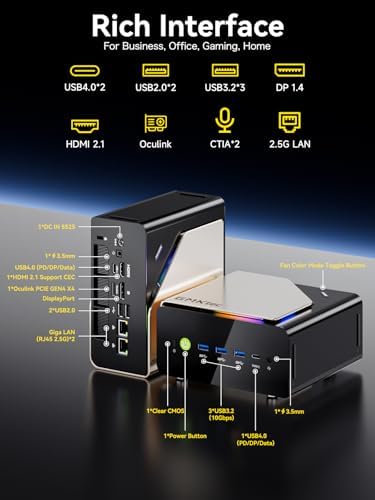
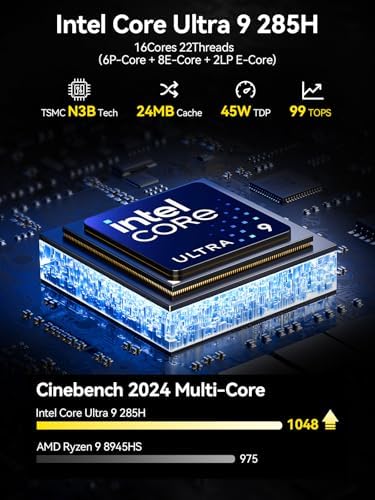
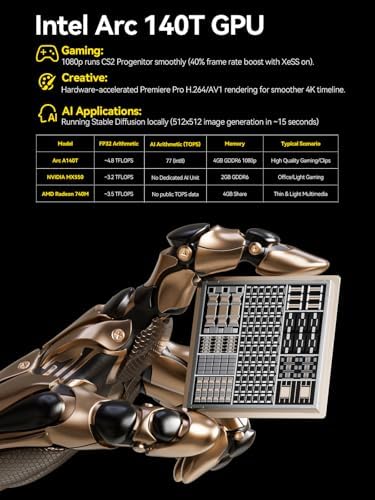
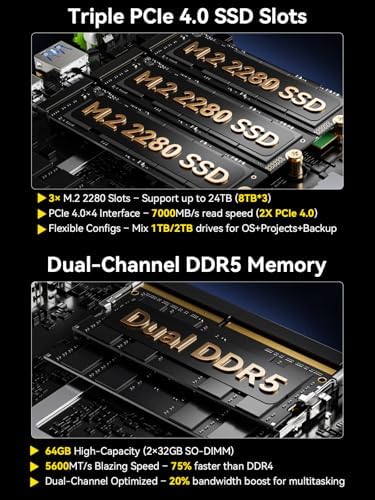
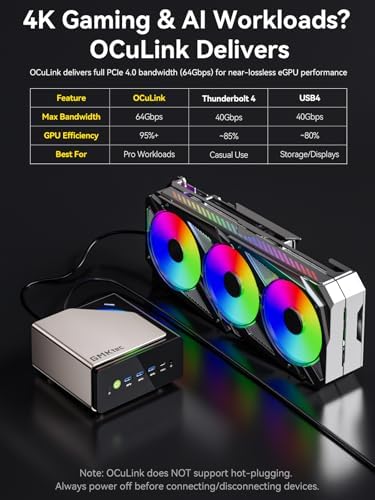
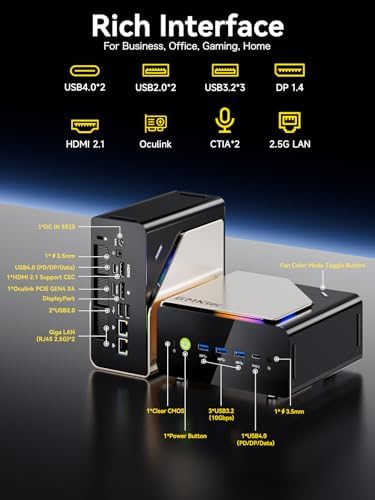
| Feature | EVOLUTION CORE ULTRA 9 285H MINI PC – GMKtec EVO-T1 is the next evolution in AI mini PC Ultra 9 series. The Core Ultra 9 285H offers 16 cores (six P-cores + eight E-cores + two LPE-cores) and 16 threads with a turbo clock of 5.4 GHz. It is currently one of the best value for performance AI mini PC computers., AI NPU – The 285H features an Intel AI Boost NPU, capable of up to 13 TOPS (Tera Operations per Second) for INT8 calculations, which is designed to accelerate AI tasks., INTEL ARC 140T GAMING PC – The Arc 140T GPU includes 8 Xe cores and supports features like DirectX 12, OpenGL 4.5, and OpenCL 3, making it capable of handling modern games and creative applications. It also supports Quick Sync Video for efficient video encoding and decoding, as well as AV1 encoding and decoding., 96GB DDR5 RAM + 2TB SSD – The EVO-T1 is equipped with Dual 48GB (Total 64GB) SO-DIMM DDR5 5600MHz memory sticks. 2TB PCIE 4.0 SSD Drive with 3x M.2 2280 Expansion slots. Each slot capable of reading up to 4TB. (12TB MAX), QUAD SCREEN 8K DISPLAY SUPPORT – EVO-T1 AI Mini PC support 4-screen 4K/8K output via HDMI 2.1 (8K@60Hz), DisplayPort 1.4 (4K@60Hz), and USB Type-C Transfer speed (supporting PD3.0/DP1.4/DATA). Ideal for gaming, video editing, and multitasking, it provides expansive and crisp multi-display support., OCULINK PORT – The Oculink port enables higher bandwidth capabilities, better frame rates and lower lag. The standard also operates at PCIe x4 speeds, compared to Thunderbolt's x3. Gamers and content creators can benefit from Oculink's higher bandwidth, resulting in better performance and lower lag for eGPU setups, FAST 2.5GBE + WIFI 6 + BT 5.2 – Ethernet 2.5GbE LAN port design provides more applications, such as firewall, multichannel aggregation, soft routing, file storage server. Built-in WIFI 6 / Bluetooth 5.2 is more stable and efficient to connect multiple wireless devices such as projector, printer, monitor, speakers and etc. |
10 reviews for GMKtec AI Mini PC Ultra 9 285H (Turbo 5.4GHz) 96GB DDR5 2TB PCIe 4.0 SSD Mini Gaming Computer 3X M.2 Expansion Slots, Oculink, Quad Screen 8K Display EVO-T1 Electronics – Size : Intel Ultra 9 285H 96GB +2TB
Only logged in customers who have purchased this product may leave a review.



Johnathan BrownJohnathan Brown –
PC Intel Core i9 13900HK Powerful, Quiet Mini PC with Excellent Multi-Monitor Support
I just bought three of these units and have them all connected to multiple screen displays. The build quality is excellent, especially for the price. You get a compact form factor, it runs very quietly, and the Intel chip delivers plenty of performance.One of the best things is the multiple screen support. I can run several monitors at once, and it works smoothly with no lag or flicker. It’s perfect for having games, videos, browsers, spreadsheets, and apps all open at the same time and visible.There are lots of ports, so you have a ton of options for how to connect everything. The system feels powerful, smooth, and simple to use. Overall, it’s a great product and fantastic value.The machine is very powerful — 32GB of DDR5 RAM is a perfect sweet spot for multitasking, and the 2TB NVMe SSD provides plenty of fast storage for all my files and apps.I am a happy repeat customer, and I would definitely recommend GMKtec products to other computer users. Overall, it’s a great product and fantastic value.
2 people found this helpful
Douglas B. –
K10 is a great mini home server
The K10 is a excellent mini computer. Runs my plex and roon servers with ease. Plex works with the Xe graphics for hardware acceleration. Breezing through recordings on plex with commercials is almost instantaneous. Plus the wi-fi is great I was able to transfer about 100 GB in data between to computers over wifi in about 20 minutes. Lots of storage space expandability with space for 3 NVME disks. Came with AirData 2TB disk and 32 GB TSMC ram. Updating took overnight but the next morning is was all good to go. If you need a home server look no further. 10 cores and 20 threads. Plus the price to performance is astounding compared to where we were years 25 ago with slower single-core systems.
5 people found this helpful
Mike M. –
Small powerhouse PC
I’ve purchased a few other mini PCs from this brand before and I genuinely like their products. This one in particular I got on sale and have been very pleased with it. For something so small, it’s got a lot of power and speed. The 2.5gbps network port has been very nice and useful for my testing 2.5gbps networking at home (so no need for an adapter). DDR5 RAM, solid CPU (no overheating), and 1TB NVMe SSD provide plenty of speed for nearly everything I need.This does have Intel iGPU, so don’t expect any high end gaming on it, but almost anything else works like a champ. It has plenty of USB connectivity, which is important for something so small so you don’t need any USB hubs. Can drive 3 displays with no issue. I have mine mounted on the underside of a monitor stand so it’s accessible yet out of the way.Unless you need a graphics intensive machine, or something high-end and specific, this will work for everything from small, niche use-cases to general everyday computing to homelabbing (I haven’t tested other OSes, but VMs run fine in Hyper-V and VirtualBox)
5 people found this helpful
Anthony V. –
Excellent value, considering current RAM prices. Needs a few tweaks
Overall a solid mini PC, 96GB of ram for this price is a steal these days. Performance is great, decent cooling keeps the CPU from throttling in multi core workloads. Only downside is that the official recovery image restores all the AI bloatware, so I would suggest extracting the drivers from the .WIM file of the recovery image, and doing a fresh install with microsoft’s official iso.Also, sleep is broken, PC will go to sleep regardless of my windows settings. A few BIOS tweaks disables sleep functionality, which is fine for my use case since I’m running it 24/7, but definitely something to take into consideration for other potential buyers.
One person found this helpful
Gregory C.Gregory C. –
GMKtec NucBox K10 Mini PC – Compact, Quiet, and Outstanding Value
The media could not be loaded.
I bought the GMKtec NucBox K10 after doing some digging, and I’ve been quite impressed with its performance, quiet operation, and overall value. This mini PC shines for productivity, development, and office tasks, especially for those who need solid power without taking up much space. I have several other GMKtec mini PCs and I keep coming back to them because of the build quality, performance, value, and support.The Cinebench results for the NucBox K10 speak volumes about its capabilities. The 13th Gen Intel Core i9-13900HK scores 118 points in single-core tasks, placing it at the top of the charts—it even outperforms Apple’s M1 Max and M1 Ultra in that area. In multi-core performance, it lands at 856 points, securing fourth place overall—better than many desktop CPUs and trailing only behind workstation-class models. These results are impressive for such a compact device, making it perfect for demanding tasks like development and multitasking.My PassMark benchmarks further back up the NucBox K10’s performance. It scored an overall rating of 5880.7, putting it in the 57th percentile. The CPU Mark hit 28,599 (79th percentile), Memory Mark came in at 4,000 (98th percentile), and Disk Mark reached 43,851.9 (90th percentile). While it’s good for integrated graphics, don’t expect it to handle gaming like a pro.In terms of noise, I measured idle noise levels at just 36 dB—barely noticeable—and full load at 43 dB—still very quiet. This makes the NucBox K10 an excellent pick for quiet offices or shared workspaces.Booting up is a breeze thanks to the high-speed NVMe SSD. Windows 11 Pro runs smoothly even with multiple heavy applications open. It’s ideal for office suites, web development, software testing, and everyday productivity tasks. Plus, there are plenty of USB-A ports available for peripherals—which I find quite handy.One feature I really appreciate is how easy it is to open the bottom panel to access the expansion slots. Upgrading memory or adding additional NVMe drives is straightforward, making it simple to future-proof your setup or tailor the machine to your needs.At $560 USD, you really get your money’s worth with the GMKtec NucBox K10. Competing mini PCs with similar specs often run $700 or more, especially models like Intel NUCs or Beelink with matching CPUs and memory configurations. Many alternatives either skimp on CPU power or come with less RAM and storage—and they usually cost more. For what you get in terms of performance and features, this mini PC is a steal.While I have this hidden behind my monitor, there are mounting slots on the back so you could easily mount it to a wall to keep it discreet.If I had to suggest one improvement, it’d be adding a USB-C port to the back of the computer. Right now, there’s only one on the front—handy for quick access but not ideal for permanent connections like docking stations or monitors. With USB-C becoming more standard nowadays, having one on the back would make life easier. Still, having plenty of USB-A ports is definitely a plus for connecting various peripherals.The GMKtec NucBox K10 stands out as a compact mini PC that packs a punch when it comes to performance and efficiency while running quietly. It might not be geared towards gaming, but if you’re into productivity and development work in a small form factor at this price point, it’s hard to go wrong here—definitely worth considering if you need a powerful yet portable workstation!
5 people found this helpful
Fasfa LeeFasfa Lee –
GMKtec NucBox K7 Plus: A Mini Powerhouse That Surprised Me
The media could not be loaded.
GMKtec NucBox K7 Plus: A Mini Powerhouse That Surprised MeWhen I first picked up the GMKtec NucBox K7 Plus, I wasn’t sure what to expect. It’s so small that I wondered if it could really handle the workload I had in mind. But after spending some time with it, I can confidently say that this little box is a beast in disguise.Setting up the NucBox K7 Plus was a breeze. It comes pre-loaded with Windows 11 Pro, which is fantastic because there’s no bloatware slowing things down right out of the gate. After a few updates, I was up and running in no time. The first thing I noticed was how fast it boots up—around 10 seconds, give or take. It’s a small detail, but I love not having to wait around for my PC to wake up.The 13th Gen Intel Core i7-13620H processor is the heart of this machine, and let me tell you, it doesn’t disappoint. With speeds of up to 4.9 GHz, this mini-PC handled everything I threw at it without breaking a sweat. Whether I was running multiple virtual machines, editing videos, or streaming content, the NucBox K7 Plus performed flawlessly. The integrated Intel UHD graphics did a solid job with everyday tasks, and even some casual gaming, though I wouldn’t push it for anything too graphics-intensive.What really impressed me was the speed of the NVMe SSD. I’ve got a 2TB SSD in mine, and it’s insanely fast. We’re talking transfer speeds around 3,500 MB/s. If you’re like me and hate waiting for files to transfer, this makes a world of difference. The dual M.2 slots mean I can easily add more storage later on, which is a nice touch for future-proofing.As someone who does a lot of video work, the performance of this mini-PC has been a huge help. It handles heavy editing tasks smoothly, and the QuickSync technology in the processor speeds up video encoding noticeably.I was initially concerned about how this tiny box would manage heat, especially since I often push my systems hard. But the cooling system in the NucBox K7 Plus is efficient and, most importantly, quiet. Even under heavy loads, the fan noise is barely noticeable. The device stays cool, too—I’ve seen temps hover around 56°C during extended use, which is impressive.One thing I really appreciate is the variety of ports on this thing. With two HDMI ports, multiple USB options, and a USB-C that supports DisplayPort, I’ve been able to connect all my peripherals and dual monitors without needing any additional adapters. Plus, the Wi-Fi 6 and Bluetooth 5.2 combo has been rock solid, making wireless connections fast and reliable.I’m someone who likes to squeeze every bit of life out of my gadgets, so the upgradability of the NucBox K7 Plus was a big selling point for me. With 32GB of DDR5 RAM already installed and the option to expand up to 64GB, this mini-PC isn’t going to be obsolete anytime soon. The ability to add more storage with the dual NVMe slots means I can easily scale up as my needs grow.Portability: A Minor DrawbackOne downside I’ve noticed is the power supply. While the NucBox K7 Plus itself is compact and light, the power supply is somewhat heavy. This makes it a bit less convenient if you’re planning to move it around frequently or use it as a portable solution. It’s not a dealbreaker, but it’s something to consider if portability is a priority for you.In the end, the GMKtec NucBox K7 Plus exceeded my expectations. It’s powerful, quiet, and future-proof—all while taking up almost no space on my desk. Sure, it’s not going to replace a high-end gaming rig, but for anyone who needs a reliable, high-performance mini-PC for multitasking, content creation, or just everyday use, this little box delivers in spades.If you’re looking for something that combines performance, compact design, and ease of use, I highly recommend giving the NucBox K7 Plus a try. It might be small, but it packs a serious punch.
29 people found this helpful
robv14000 –
Fastest Computer I Own — BUT NOW BECOMES UNUSABLE AFTER WINDOWS UPDATE
Late 2023 probably: Super fast, compared to my other PCs. I had a problem connecting an external BD reader (via a SATA-to-USB3 connector), so I cannot use that with this PC. Otherwise everything is working as advertised, including USB3 for external HDDs. HDMI and DP also worked fine, as did wireless (USB2 dongle) keyboard and mouse. My gigabit LAN works just fine. Windows 11 Pro is successfully activated. I have not tested USB-C. I was able to expand the RAM to the maximum 64 GB, but due to unclear documentation, I was not able to add an SSD expansion (which I had bought and then returned). In fact, I found the documentation so lacking that I tried “Contact Us” with the manufacturer, and did not get a reply. I finally gave up, and did not add more internal SSD. Because this PC uses SSD storage, I do NOT use it for a lot of writes and rewrites: that is all done with real, networked HDDs. (In my experience, SSDs have a limited shelf life if you constantly write and rewrite them.) This was well worth the money.UPDATE March 2025: I am changing my review from 5 stars to 1 star. This Mini-PC was working great until a Microsoft (MS) update killed it. After I log in, the screen goes black. I can then Ctrl+Alt+Del and THAT window shows up (rest of screen) still black. I finally muddled through restoring an earlier version of the PC (before the Windows Update). By the next day the PC had died again because Microsoft insisted on reinstalling the “bad” update. It took me forever to figure out how to stop MS from reinstalling the update. (You stop downloads via the Registry. It still thinks I should install the update, but it seems thwarted — for now.) Trying to contact MS proved impossible. Their automation is such that it doesn’t consider that an update is bad. There is no way to tell them that, that I could find. I tried looking on the Intel site for a video-driver update, but that accomplished nothing. Some INTEL GRAPHICS UTILITY (or some such) comes up from time to time and says something is wrong, but it doesn’t tell me what. I go to the MS shop and it says that app is installed and up-to-date. TWICE I HAVE TRIED TO CONTACT GMKtec support and TWICE it has ignored my entreaties. I hold open the possibility that my firewall or Ad Blocker or Privacy Badger is blocking something (since I run an email server), but there is no indication ANYWHERE of what I have to let through. If GMKtec is trying to get through, they are blocked, and the AMAZON page gives no hint on what IPs, etc. need to get through. In my experience, it is not my PC blocking the connection: it is there is no active GMKtec support, despite what the AMAZON web page says. So I am STUCK with no longer being able to install MS updates. And to underline how arrogant MS is, it doesn’t give you the ability to block just one update. In older versions of Windows, you could block a specific update, but not in the newer versions. If I went back to allowing downloads, it would install the bad update. The PC is running Windows 11 Pro. I can still use the Mini-PC; I can just no longer update it with MS updates. And if you’re wondering, I did connect a second monitor and try to get things to work that way, but MS Windows completely freaked out and forgot how to do the desktop. (I’ve done it before with other WIndows, and I can navigate mulitple displays just fine with them. It’s something about the video on this PC and Windows 11, is my guess.) So for now, I can use the Mini-PC but cannot get MS updates for, for example, so-called critical vulnerabilities. MS is absolutely no help — their interface has no “update is bad” report function. And GMKtec, as far as I can tell, does not actively support their product, despite what the implication is on the AMAZON web site. The Mini-PC worked for for more than a year…until the “bad” MS update. Oh, yeah, I searched for and downloaded drivers from the GKMtec web site and presumably installed them (that process was clear as mud), so who knows — maybe I didn’t install them. I wasn’t born knowing how hardware works…or software for that matter…
20 people found this helpful
Wyatt –
Solid build quality and power at an unbeatable price.
My first Windows machine in years. Tried several HP 17″ laptops, and they all failed within a few days. I purchased this machine with skepticism. It turns out that this is maybe the best computer I have ever owned. It is incredibly powerful and easily run multiple external HD touchscreen monitors and rocks memory intensive games and other 3D software. Windows 11 Pro is just fine. This machine comes with almost no bloatware and almost no app/software “clean up” is needed. If you want bad ass build, at a ridiculously low price, this is your ticket. Notes – I have only run the machine for 3 days. I will update my review after some time. — This is the screen that I am connecting (x2). amazon.com/dp/B0F9SNYJDN?ref=ppx_yo2ov_dt_b_fed_asin_title
Tristan GTristan G –
Great value Mini PC
Bought this Mini PC with the goal of using it both as a Linux server for low power usage, and for some Windows 11 media encoding and playback. Here are my findings.The power supply is quite large and heavy compared to the competition, and the cable to connect to the computer is a bit thinner than most laptop PSUs of the same wattage, suggesting this isn’t designed for portability or repeated mechanical stress on the cable, so keep that in mind.Size-wise, these measure up a little bigger than Intel’s competing NUC 13 Pro series with a few extra mm on each dimension, with the only redeeming feature in the K7 Plus being an additional NVMe SSD slot and the extra ethernet socket; otherwise, the competing offering is far more compact.For networking, the use of two 2.5GbE ports based on the Intel i225-V chipset is handy, but could be excessive. given those who require two 2.5GbE ports for Internet routing duties will likely opt for lower power alternatives. I am, of course, a minority – and having a second port is useful for network engineering duties sometimes so this was one of the reasons I chose this system. The only type C port available is a USB-4 Thunderbolt capable port on the front of the chassis, so it gets in the way if you plan on using this with a thunderbolt dock, eg, an external GPU. I tested am LG 5K display and verified operation with 5K @ 60Hz, but ergonomically, having the cable protrude from the front of the system was inconvenient. A system of this calibre really should sport two USB-4 type C ports, one on the rear, and one on the front.The cooling system seems adequate in terms of ventilation, but the fans included are rather small, and can get a bit noisy at higher RPM; I recommend avoiding the performance profile in BIOS, and stick to the balanced or quiet (labelled as “quite” on my version, but likely a typo). I didn’t experience any thermal throttling.The WiFi chip included is the Intel AX201, not the 6E (6GHz)-capable AX211 we would expect here, so we only get 2.4GHz and 5GHz available. It would have been ideal to see Intel’s WiFi 7 chipset included with this system, but fortunately the PCIe Intel BE202 is compatible with this system, so you can upgrade to provide tri-band WiFi 7 functionality. Note that Windows 11 24H2 is required for WiFi 7 support, which is only part of the insider program at time of writing.The device comes with an HDMI cable in the box, which is an unique feature with today’s systems and is a welcome addition.Power usage is a little disappointing, hitting around 10W at idle driving an HDMI display. Alternatives on the market will idle at less than 5W. There is obvious room for improvement that can be had here, and there is a lot of work that GMKTek should be doing around power efficiency across the board, either with selecting chipset and peripherals that support lower power states, or implement the appropriate firmware or BIOS code to enable it. Under load when installing Windows updates, I saw it draw 47W; those who are power users shouldn’t need worry as low power states will not apply.The CPU in this is unaffected by the recent CPU oxidisation issue and I have thrown a few heavy loads at this system with media encoding and have not seen a crash yet, so that’s a good sign.Graphics performance is adequate for modern uses, however heavy gamers will want to opt for a system with a higher power graphics processor such as the GMKtek K9.The K7 Plus might have some small advantages where more P-cores are required, for example, when using VMware ESXI.The system includes Windows 11 Pro, useful if this is to be integrated with an active directory or corporate LAN.Upgradability is right here, supporting a maximum of 96GB RAM and an additional M2 slot; this makes it an attractive option as an ESXi virtualisation server. If you do run ESXi, it would be recommended to disable the E-cores to ensure that VMs land on the performance cores, or else, you’d want to manually set CPU affinity within the VM settings to get the best performance. I have been able to successfully run ESXi on this hardware.Although alternatives offer rear-facing Thunderbolt 4 ports, lower power consumption and smaller sizes, The GMKtek system represents better value and the included 32GB+2TB package makes it an attractive option for a Mini PC solution as it’s significantly cheaper, and these seem to be the only units with dual 2.5GbE.
11 people found this helpful
JohnWDobie –
Small but mighty!
I love this computer so far! Pros: lots of RAM, lots of storage, sparkling performance. Cons: no DVD player (seems to be the trend these days though), no VGA connection (also seems to be the trend these days – but because of this, I had to replace my monitor, which didn’t have an HDMI connection).